


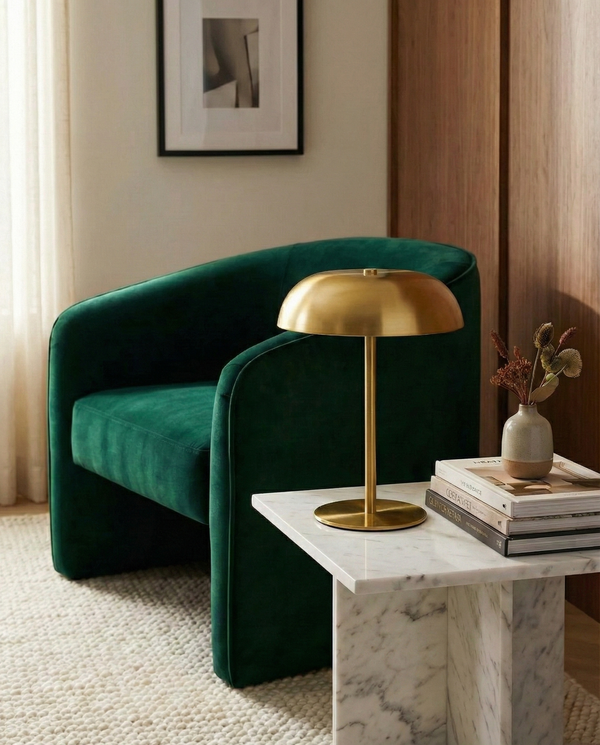

You touch the lamp and it turns on. You touch it again and it changes mode. A long touch and the intensity rises or falls progressively. No button, no switch, no remote control to search for. This is the principle of the touch-sensitive lamp — and once you've tried it, there's no going back.
Looking for the right one? Browse our table lamps — 21 designs curated by Lumora.
But how does it really work? Why are some touch-sensitive lamps fluid and others temperamental? And above all, is it really better than a good old button? This guide answers all your questions.
How a touch-sensitive lamp works: capacitive technology
The touch-sensitive lamp relies on capacitive sensing, exactly the same technology as your smartphone screen. Here's the simplified principle:
The human body conducts electricity. When you touch the metal surface of the lamp, you modify the electric field around the sensor. A micro-controller detects this variation and triggers the corresponding action: turning on, turning off, changing mode or adjusting intensity.
The key components
- The capacitive sensor — a plate or printed circuit board built into the base or body of the lamp
- The micro-controller — the "brain" that interprets the signal and controls the LED
- The LED driver — manages the power sent to the LED depending on the chosen mode
The advantage of this technology: no mechanical parts. No button that wears out, no mechanism that seizes up, no contacts that oxidise. The lifespan of the touch system is theoretically unlimited.
Why some touch-sensitive lamps work better than others
The quality of the sensor and the micro-controller makes all the difference. A low-end sensor may:
- React to vibrations or humidity (false triggers)
- Fail to detect a light touch (you have to "press" hard)
- Have a perceptible response delay
- Handle dimming poorly (jumps in intensity instead of a smooth variation)
A good capacitive sensor reacts in less than 50 milliseconds and offers a perfectly smooth intensity variation.


The advantages of touch control
Elegance and minimalism
No visible button means a clean, continuous design. The lamp is a smooth, harmonious object, without visual interruption. This is one of the reasons why all high-end designer lamps adopt touch control.
Comfort of use
In the dark, finding a small switch is a test of dexterity. With touch control, simply touch any part of the base. This is particularly welcome for bedside lamps: an instinctive gesture in the darkness is enough.
Hygiene and ease of maintenance
No button where dirt accumulates, no groove to clean. A wipe with a cloth across the whole surface and it's clean. The smooth surfaces of touch-sensitive lamps are also easier to disinfect.
Durability
A mechanical switch has a lifespan of 10,000 to 50,000 cycles. A capacitive sensor has no mechanical limit — it works as long as the electronics work. It's one less part that can fail.
Touch dimming: intensity at your fingertips
Dimming (intensity variation) is the feature that truly distinguishes good touch-sensitive lamps. Here's how it works:
- Short touch — turns the lamp on or off, or moves to the next mode
- Long touch — gradually increases or decreases the intensity as long as you maintain contact
- Double touch — on some models, changes the colour temperature
Continuous dimming is far superior to preset levels (3 fixed levels). With continuous dimming, you set the intensity exactly as you wish: a faint glow for a night-light, medium lighting for ambience, full power for reading.
Touch dimming turns a simple lamp into a bespoke ambience tool. It's the difference between an on/off switch and an infinite rheostat.
Touch vs remote vs button: the comparison
| Criterion | Touch | Remote | Button |
|---|---|---|---|
| Responsiveness | Instant | Fast | Instant |
| In the dark | Easy | Easy | Difficult |
| Aesthetics | Excellent | Good | Average |
| Durability | Unlimited | Good | Limited |
| Object to lose | No | Yes | No |
| Dimming | Continuous | Stepped | Rare |
| Intuitive | Yes | Average | Yes |


Maintaining your touch-sensitive lamp
A few tips to maintain sensor responsiveness:
- Clean regularly the touch area with a soft, slightly damp cloth
- Avoid abrasive products that could scratch the surface and impair conductivity
- Dry thoroughly after cleaning — residual water can cause false contacts
- Do not place metal objects on the touch area when the lamp is on standby
Our selection of touch-sensitive lamps
All our Lumora lamps feature latest-generation capacitive touch control.
Belora — Rechargeable touch mushroom lamp
The touch-controlled mushroom lamp: tap the cap to change the intensity and switch between warm, neutral and cool light. Built-in battery, USB cable included.
- Table lamp
- Touch control
- 3 light tones
- Cordless rechargeable
- 8 colours

Carora — Cordless mushroom lamp, 3 intensities
The iconic mushroom lamp in a touch-sensitive, cordless version: tap the top to switch on, three intensities (dim, reading, bright), USB-C charging and a matte finish. Cable included.
- Table lamp
- Touch activation
- 3 intensities
- USB-C rechargeable
- 4 colours

Nelora — Compact brushed-metal touch lamp
An organic shape and a magic touch: tap to switch on, change the mood or switch off. Three colour temperatures, variable intensity, USB-C charging. Cable included.
- Table lamp
- Touch control
- 3 colour temperatures
- USB-C rechargeable
- Silver or gold
Frequently asked questions about touch-sensitive lamps
Can a touch-sensitive lamp turn on by itself?
With a quality sensor, no. False triggers are the sign of a poorly calibrated or low-end sensor. Lumora lamps use sensors with software filtering that eliminate interference (vibrations, humidity, electromagnetic fields).
Does touch work with gloves?
Classic fabric gloves block the capacitive signal. Only "touchscreen-compatible" gloves (with conductive threads) allow you to activate a touch-sensitive lamp. In practice, this is only an issue outdoors in cold weather.
Do touch-sensitive lamps consume more on standby?
The sensor consumes around 0.1 to 0.3 watts on standby — negligible. Over a year, that represents less than 2 kWh, i.e. a few pence of electricity. Standby consumption is not an argument against touch.
Can the sensor wear out over time?
No. Unlike a mechanical button, the capacitive sensor has no moving parts. It doesn't wear out physically. Its lifespan is that of the electronics themselves, typically 20,000 to 50,000 hours — well beyond the lifespan of the LED.
Touch-sensitive: the obvious choice in 2026
Touch control is no longer a luxury or a gadget. It has become the standard of modern lighting for one simple reason: it's more intuitive, more elegant and more durable than a mechanical switch. The only question that remains: which model to choose?
See the whole Lumora collection →
Free shipping to mainland France. Free returns within 30 days. Secure payment.
The Lumora team's opinion
Touch control changes everything in daily life. Especially as a bedside lamp: no more searching for a button in the dark. A simple brush of the base and the light comes on. Our customers often tell us it's the detail that has most positively surprised them.


